How deja works
deja turns cleaning your camera roll into something you look forward to: you meet a day from your past, and the tidying happens on the way.
01
deja deals you a day
Every day, or every week if you relive a week at a time, deja picks a period from your past that you haven't relived yet: a random one, or the same day in an earlier year. Today's pick sits on your calendar wall and in the widget.
02
You relive it like a story
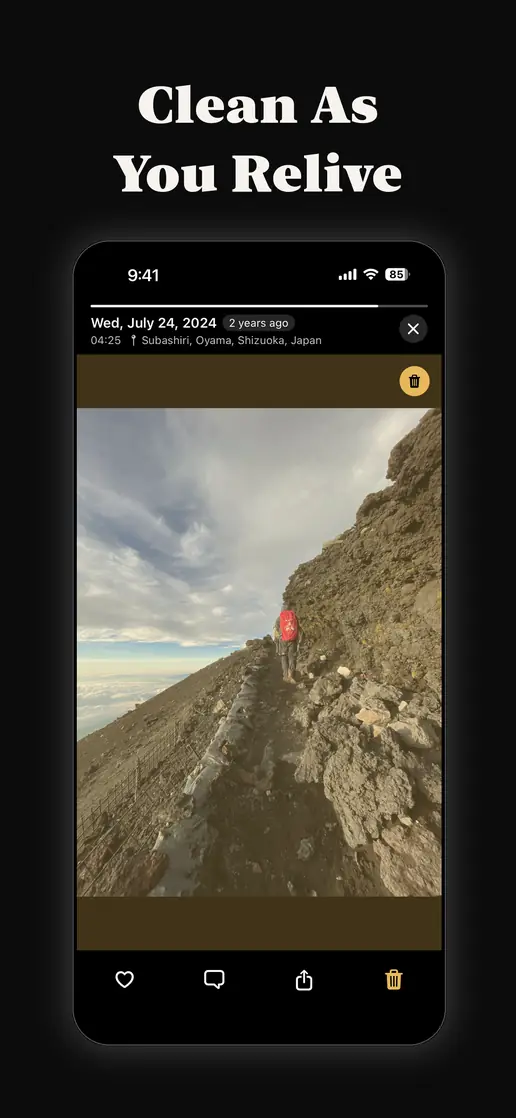
The photos and videos of that period play full screen, in the order you took them, with the date, time and place. Tap to move through them, hold to pause, swipe up to write a note.
03
You ♥ and 🗑 along the way
♥ the ones you love: they become covers on your calendar wall. Mark the blurry, duplicate and accidental with the trash. Nothing is deleted yet.
04
You clear them all at once
At the end, deja shows what you marked and how much space it takes. One tap, one iOS confirmation, and the whole batch is gone. Then you get a card of the day to keep or share.
Gestures while reliving
- Tap the right side
- Next photo
- Tap the left side
- Previous photo
- Hold the left or right side
- Skim quickly, like winding film
- Hold the middle
- Pause
- Swipe up
- Write a note
- ♥ / 🗑
- Favorite / mark for deletion
What happens when you delete
Marking a photo only marks it. Photos are deleted when you press Delete at the end and confirm in iOS's own dialog — once for the whole batch, not once per photo.
Deleted photos go to the Recently Deleted album in Apple's Photos app, where iOS keeps them for 30 days, so a mistake can still be undone.
Marks you didn't clear stay saved. Settings lists every photo you marked and never deleted, so you can review and clear them later.
Your photos stay on your iPhone
deja works with the photo library on your iPhone through Apple's Photos framework. It doesn't copy, upload or store your photos anywhere else.
There is no account and no sign-up. Your hearts, notes and progress are stored on your device.
You can give deja access to your whole library or only to selected photos, and change it any time in iOS Settings.
What is free
Cleaning up is free, always, with no limit: deleting your own photos should never cost anything.
Reliving uses credit, one per photo, and each photo only once — going back to a day you already relived is free. You start with 50 and can earn up to 100 more with small tasks in the app.
deja Pro removes the limit for people who relive every day. It is a monthly or yearly subscription, or a one-time Lifetime purchase.

Free on the App Store · iPhone, iOS 18 or later